
EMRG Developers · v1
Booking API
Build your clinic's booking experience: create patients, browse services and availability, collect a saved card through EMRG, and book with questionnaire answers in notes. Saving a card and booking an appointment do not make a purchase.
Booking API base URL
https://api.joinemrg.com/api/v1Both environments use this base URL. The API key selects the environment. Append the endpoint path shown below, such as /partner/patients. The cURL examples already contain complete URLs.
All partner requests run from your server. Your patient-facing website calls your server, which holds the EMRG key. Only the EMRG-hosted card page handles card entry.
| Relationship | How booking is scoped |
|---|---|
| Direct clinic | The booking clinic and service-provider clinic are the same; providerGroupId is null. |
| Service consumer in a provider group | The clinic that creates the connection is the referring/booking clinic. Catalog, providers, slots and appointments belong to the bound service-provider clinic. The API records the referral relationship. |
The clinic/provider binding is chosen when the connection is created. You cannot override clinic IDs in a booking payload. Check connection context before integrating.
v1 scope
Start with your first sandbox booking, follow the booking flow, then complete the go-live checklist. All IDs and patient details in examples are synthetic; use IDs returned by your own environment.
First sandbox booking
Make one complete booking with a synthetic patient and card. The runnable example carries returned IDs from one step to the next, so you do not need to assemble the reference snippets or invent a slot.
1. Create a sandbox connection and key
In API & Webhooks, create a sandbox connection and issue a key with booking:read and booking:write (Full access includes both). EMRG automatically prepares synthetic clinic/provider data, a consultation service, and recurring daily availability. Keep the key on your server.
Clinic-scoped testing
SANDBOX_NOT_CONFIGURED or SANDBOX_NOT_READY requires EMRG to finish database setup. If setup is busy, retry shortly.2. Run the local example
Download the Node/TypeScript example, extract it into a private folder, and open a terminal in that folder. You need Node.js 22.15 or newer. Run these commands in Bash; the prompt keeps the key out of shell history.
read -rsp 'Sandbox API key: ' EMRG_API_KEY; echo
export EMRG_API_KEY
npm start
Open http://127.0.0.1:4310. Use that exact host. The server calls GET /partner/context and checks the environment, connection and permissions before starting. The default API base URL is https://api.joinemrg.com/api/v1; the example refuses live keys.
3. Choose a real sandbox slot
Select a service and a date, then click Load / refresh availability. Choose a time and provider from the returned slots. The date and displayed times use the service-provider clinic's timezone; the request keeps EMRG's exact UTC startTime.
The server reads the catalog, eligible providers and availability. Empty results mean no available slots on that date; try another date or ask EMRG about the fixture schedule. Availability does not reserve capacity.
4. Create the patient
Click Create patient. The example sends Alex Example with a unique synthetic email and external patient ID, saves the returned patientId, and displays it. A new patient returns HTTP 201; an identical existing association can return 200. No card or email verification is needed to create the record.
5. Save the synthetic card on EMRG
Click Create / reopen card link, then open the EMRG card form in a new tab. The server created a setup session with the patient ID and received setupSessionId, setupUrl and expiresAt. Use the complete returned link.
| Field | Sandbox value |
|---|---|
| Name on card | Alex Example |
| Card number | 4111111111111111 |
| Expiry | Any future expiry accepted by the form |
| CVC | 123 |
Submit on EMRG's form and return to the local example. It polls the setup status, at least 15 seconds apart with backoff and respect for Retry-After. Continue only when state is succeeded and paymentMethodId is present.
Start with a full-page link
6. Book and confirm
Click Book selected slot. The server refreshes availability and posts the selected type, provider and UTC time with the patient ID, saved payment-method ID, stable external booking ID and sample questionnaire notes.
EMRG returns HTTP 201, status: SCHEDULED and an appointmentId. The page then shows the confirmation. Booking and saving a card do not make a purchase.
Verify the saved record without database access: from your server, call GET /partner/appointments/{id} with that appointmentId and the same connection's key. Compare the patient/provider IDs, UTC times and notes with your request. The GET returns current status and booking notes, including later staff changes; the creation response and receipt describe the original write.
# Replace with appointmentId from your successful booking response.
APPOINTMENT_ID='YOUR_APPOINTMENT_ID'
curl --fail-with-body --silent --show-error \
  "${EMRG_API_BASE_URL:-https://api.joinemrg.com/api/v1}/partner/appointments/$APPOINTMENT_ID" \
  --header "Authorization: Bearer $EMRG_API_KEY"
A failed verification read does not undo the booking. Retry the GET as appropriate, respect Retry-After, or reconcile the original write; never create a replacement appointment just because verification failed. Sandbox does not send real notifications or live reporting events.
If the slot was taken, refresh availability and deliberately choose another time; the patient and card remain saved. If the outcome is unknown, wait as instructed and click Resume original request. Do not create another booking to work around a timeout. See recovery recipes.
What to keep after the walkthrough
Keep the patient ID, setup session ID, payment-method ID, appointment ID, and each logical write's external ID, exact payload and idempotency key. The example persists these in a private local state file and resumes the same workflow after restart. For a separate completed test, stop it and use a fresh example folder.
Next, read the example implementation, adapt it to your clinic's server, and complete the go-live checklist. Analytics and webhooks can be added after the core booking works.
Booking flow
- Read appointment types, providers and availability. Choose a provider from the selected slot's
providerIds. Browsing does not require a patient record. - Create a patient with a stable external ID; retain the returned
patientId. You can also create the patient before slot selection. - Create a card setup session for that patient. Give its unmodified URL only to the intended patient through your authenticated booking session.
- Embed the EMRG form or open it in a new tab. Poll status from your server until a final state. Continue only when
succeededreturns apaymentMethodId. RespectRetry-Afteron 429 responses; never automatically repeat card submission. - Refresh availability and book with that card, the returned UTC slot, and plain-text notes. Each new write needs its own
Idempotency-Key. - Confirm the booking only after a successful response or reconciled receipt. Send optional analytics separately.
sequenceDiagram
  autonumber
  participant B as Clinic website
  participant S as Clinic server
  participant A as EMRG API
  participant F as EMRG card form
  Note over S,A: Paths below are relative to /api/v1<br/>Partner calls use the clinic server's API key
  S->>A: GET catalog, providers and availability
  A-->>S: UTC slots and eligible provider IDs
  S-->>B: Show appointment choices
  B->>S: Choose slot and submit patient details
  S->>A: POST /partner/patients
  A-->>S: patientId
  S->>A: POST /partner/card-setup-sessions
  A-->>S: setupSessionId, setupUrl, expiresAt
  S-->>B: Show setupUrl in iframe or new tab
  Note over B,F: Patient enters card only in the EMRG-origin form
  F->>A: POST /hosted-card-setup/card<br/>Uses setup tokens, not the clinic API key
  Note over S,A: Poll at least 15 seconds apart<br/>On 429, wait Retry-After and retain the session
  loop While pending, contact_submitting or card_submitting
    S->>A: GET /partner/card-setup-sessions/{id}
    A-->>S: state (succeeded includes paymentMethodId)
  end
  alt succeeded with paymentMethodId
    S->>A: Refresh availability
    A-->>S: Current UTC slots and eligible providers
    loop For each selected slot - stop when booked or patient stops
      S->>A: POST /partner/appointments<br/>patientId, paymentMethodId, slot, provider and notes
      alt Booking committed
        A-->>S: 201 SCHEDULED and appointmentId
        S-->>B: Booking confirmed
      else Slot no longer available
        A-->>S: 409 SLOT_UNAVAILABLE
        S->>A: Refresh availability
        A-->>S: Current UTC slots and eligible providers
        S-->>B: Choose another time - keep patient and saved card
        B->>S: Select another slot
        Note over S,A: Changed slot = new Idempotency-Key on next attempt
      end
    end
  else failed or expired
    S-->>B: Offer a new setup session using a new idempotency key
  else superseded
    S-->>B: Open the newest setup link
  else requires_review
    S-->>B: Contact clinic - do not repeat card submission
endA saved card and patient survive a failed booking. Availability is a snapshot, not a reservation. The booking transaction enforces capacity again. The diagram shows successful booking and slot-conflict handling; for a timeout or unknown outcome, reconcile the original request with its original idempotency key before starting another attempt.
Authentication
A clinic administrator opens API & Webhooks → Booking API, names a connection, chooses Sandbox or Live, selects the available service-provider binding and access level, then chooses Create key.
| Permission | Allows |
|---|---|
booking:read | Catalog, providers, availability, setup status and write receipts. |
booking:write | Patient creation, card setup session creation and appointment booking. |
analytics:write | Submitting anonymous funnel events. |
Full access includes all three permissions; Read/write includes booking:read and booking:write; Read only includes booking:read. The context endpoint needs a valid key but no additional permission. Keys begin with emrg_test_ or emrg_live_; send the entire secret, not the displayed prefix.
curl --request GET 'https://api.joinemrg.com/api/v1/partner/context' \
  --header "Authorization: Bearer $EMRG_API_KEY"
Keep keys on your server
EMRG_API_KEY in your server's secret storage before running the examples. Never place the key in browser code, a mobile bundle, a query string, analytics or source control. Partner keys do not authenticate EMRG's staff or patient-portal endpoints.Connections and key rotation
A connection owns its environment, permissions, clinic/provider binding, allowed website origins and integration records. Multiple keys on that connection share the same scope, retry history and rate limit.
- Use the connection's menu to Issue new key.
- Deploy the new secret on your server and verify it with
GET /partner/context. - Reconcile in-flight requests and let pending card links finish before revoking the old key when practical. Revoking an issuing key invalidates its hosted card links.
- Revoke the old key. Disabling the connection blocks all its keys and hosted links.
Use another key on the same connection for rotation. Creating an entirely new connection does not transfer patient associations, payment setup sessions or idempotency receipts.
Sandbox and live
Sandbox and live are separate connections. A sandbox key is never promoted into a live key, and sandbox IDs cannot be used with a live connection.
| Behavior | Sandbox | Live |
|---|---|---|
| Patients, schedules and bookings | Separate test database and synthetic clinic/provider fixtures | The bound clinic's real records and scheduling |
| Card storage | Simulated contact/card IDs; no Linked2Pay calls | Uses clinic payment credentials through EMRG |
| Reports and delivery | Excluded from live reporting; no real confirmations, reminders or partner webhooks | Booking facts committed atomically; reporting and notifications delivered asynchronously |
| Key creation | Automatically prepares clinic-scoped synthetic fixtures; never copies live patient data | Does not verify payment or scheduling configuration |
Sandbox provisioning
SANDBOX_NOT_CONFIGURED or SANDBOX_NOT_READY, EMRG must finish the database setup; changing the key will not fix it.Synthetic cards for the hosted sandbox form
| Card number | Result |
|---|---|
4111111111111111 | Card saved; session becomes succeeded. |
4000000000000002 | Simulated rejection; session becomes failed. |
Use a synthetic cardholder name, a future expiration date and a 3- or 4-digit CVC (for example, 123). Other numbers are rejected with SANDBOX_CARD_REQUIRED. Never use real patient or card information in sandbox. These numbers are for EMRG's sandbox simulation, not for testing a live merchant account.
Sandbox validates the API workflow and retry behavior; it does not simulate every processor failure or validate live merchant credentials.
Idempotency
Every partner POST requires exactly one Idempotency-Key header: 1–128 characters from A–Z a–z 0–9 . _ : -. A UUID or opaque operation ID works well. Do not put patient information in the key.
| Situation | Behavior / action |
|---|---|
| Same connection, environment, key, operation and body | Returns the committed result with X-Idempotency-Replayed: true, even after API-key rotation. |
| Same key, different operation or payload | 409 IDEMPOTENCY_CONFLICT. Object property order and JSON whitespace do not matter; array order and values do. |
| Concurrent request still processing | 409 REQUEST_PROCESSING. Back off and retry unchanged with the same key. |
| Timeout, disconnect or 5xx | Outcome may be unknown. Look up the receipt, then replay the same request with the original key if necessary. |
| Corrected validation error or newly selected slot | This is a different request: use a new key after resolving the previous outcome. |
Persist the key and exact payload on your server before sending a write. Keys are shared across all write endpoints in a connection/environment, so do not reuse a patient-creation key for booking or analytics.
Definitive patient and booking rejections may also have committed receipts. Retrying their original key repeats the rejection. Transient errors and operations that roll back may have no receipt.
A missing receipt is not proof of failure
404 REQUEST_NOT_FOUND can mean another request has not committed yet. Do not generate a new key after a timeout. See request reconciliation.For card setup creation, replay returns the original session and expiry with an equivalent setup URL; it does not extend the link's lifetime. These retry rules apply to partner POSTs, not raw card submission. Only the EMRG form submits cards, and an uncertain submission is reconciled through status reads.
Errors
Application errors use an HTTP status and a stable code. Branch on the code; messages are intended for people and may change.
{
  "code": "SLOT_UNAVAILABLE",
  "message": "The slot is no longer available. Choose another slot; the patient and saved card remain available.",
  "requestId": "10000000-0000-4000-8000-000000000001"
}
Record the X-Request-Id response header for support. It identifies this HTTP attempt; a body's requestId can instead identify a persisted write receipt and stay the same on replay.
Malformed JSON, invalid route/query types, oversized requests and upstream failures may return framework problem details, an empty response or non-JSON content. Handle the HTTP status even when no code is available. Requests use JSON with camelCase field names; write payloads reject unsupported fields.
| HTTP | Code | What to do |
|---|---|---|
| 400 | INVALID_IDEMPOTENCY_KEY | Send exactly one key, 1–128 characters: A–Z, a–z, 0–9, dot, underscore, colon or hyphen. |
| 400 | DUPLICATE_JSON_PROPERTY | Remove duplicate property names from the JSON body. |
| 401 | INVALID_CREDENTIAL | Check the full key, connection enabled state and key revocation. Do not retry unchanged indefinitely. |
| 403 | INSUFFICIENT_PERMISSION | Use a connection with the required permission. Adding another key to the same connection does not change permissions. |
| 404 | REQUEST_NOT_FOUND | No committed receipt is visible. This is not proof of failure; reconcile using the original request and key. |
| 404 | PATIENT_NOT_FOUND | Use a patient created by this connection and environment. Other connections' patients cannot be claimed by ID. |
| 404 | APPOINTMENT_NOT_FOUND | Use an appointment created by this connection in this environment. Unknown IDs and appointments outside the connection's current clinic/patient scope return the same error. |
| 404 | APPOINTMENT_TYPE_NOT_FOUND | Refresh the catalog; the type must be published at this connection's service-provider clinic. |
| 404 | PROVIDER_NOT_FOUND | Refresh the eligible providers for the appointment type. |
| 404 | SETUP_NOT_FOUND | Check the session ID, connection and environment. |
| 409 | REQUEST_PROCESSING | Back off and retry the identical write with the same key. A concurrent operation holds the lock. |
| 409 | IDEMPOTENCY_CONFLICT | A key was reused for a different operation or payload. Reconcile the original before creating a separate request. |
| 409 | EXTERNAL_PATIENT_ID_CONFLICT | The external patient ID already has different creation details. This endpoint does not update patients; contact clinic staff. |
| 409 | PATIENT_REQUIRES_REVIEW | An existing chart has this email at the service-provider clinic. Staff must review it; do not change the email or external ID to bypass the check. |
| 409 | PATIENT_UNAVAILABLE | The association is unavailable or the patient cannot book online. Contact clinic staff. |
| 409 | EXTERNAL_BOOKING_ID_CONFLICT | A successful booking already uses this external ID with different details. Do not silently create a second booking. |
| 409 | SLOT_UNAVAILABLE | Refresh availability, ask the patient to choose, and submit the new slot with a new idempotency key. Patient and saved card remain available. |
| 409 | PAYMENT_METHOD_UNAVAILABLE | Complete card setup for this patient, connection and current payment account, then make a new booking attempt. |
| 409 | BOOKING_RELATIONSHIP_UNAVAILABLE | The clinic/provider relationship changed or is unavailable. Ask the clinic administrator to correct it. |
| 409 | ANALYTICS_EVENT_CONFLICT | An event ID already has different content. Keep the original event immutable; the conflicting batch is not accepted. |
| 422 | INVALID_PATIENT | Correct the patient fields; send a new idempotency key for the corrected payload. |
| 422 | INVALID_REQUEST | Use documented camelCase fields, JSON types and limits; unknown fields are rejected. |
| 422 | INVALID_BOOKING | Check non-empty IDs, plain-text notes, and a startTime ending in Z or +00:00. |
| 422 | INVALID_AVAILABILITY_DATE | Use a service-provider-local date from today through 366 days ahead. |
| 422 | INVALID_ANALYTICS_EVENT | Check event names, anonymous UUIDs, host/path restrictions and campaign codes. Do not send patient or card data. |
| 422 | INVALID_EVENT_TIME | New events must be at most seven days old and no more than five minutes in the future. |
| 429 | RATE_LIMITED | Wait at least Retry-After before retrying; use the same key for an unchanged partner write. |
| 500 | INTERNAL_ERROR | Treat a write's outcome as unknown. Look up its receipt and reconcile with the same key and payload. |
| 503 | SANDBOX_NOT_CONFIGURED | EMRG must configure an isolated sandbox database/login. Clinic fixtures provision automatically once storage is ready. |
| 503 | SANDBOX_NOT_READY | EMRG must check sandbox database access and apply its schema. Creating another key does not fix storage setup. |
| 503 | SANDBOX_PROVISIONING_BUSY | Another initial sandbox setup is processing. Retry shortly, preserving the payload and idempotency key for writes. |
| 503 | INVALID_ENVIRONMENT | The connection environment cannot be used. Contact EMRG. |
| 503 | SCHEDULE_CONFIGURATION_UNAVAILABLE | Clinic scheduling or timezone configuration needs attention. |
| 503 | PAYMENT_CONFIGURATION_UNAVAILABLE | Clinic payment credentials need attention. Patient creation can still succeed independently. |
| 503 | HOSTED_SETUP_NOT_CONFIGURED | The EMRG-hosted card page is unavailable or not configured. Contact EMRG. |
Hosted card form and origin settings
These additional errors apply to the EMRG form or connection settings. Clinics integrate the setup URL and status endpoint, not the raw card endpoints.
| HTTP | Code | What to do |
|---|---|---|
| 401 | INVALID_SETUP_TOKEN / INVALID_FRAME_TOKEN | Reopen the original setup URL. Expired/revoked access cannot be repaired by changing the URL. |
| 403 | FRAME_SETUP_MISMATCH | Use both parts of the same original URL. Do not combine tokens from different sessions. |
| 403 | HOSTED_ORIGIN_REQUIRED | Use the EMRG-hosted form; the clinic browser/server must not submit raw card data to these endpoints. |
| 409 | PAYMENT_ACCOUNT_CHANGED | Ask the clinic server for a fresh setup session using the current payment account. |
| 409 | PAYMENT_ACCOUNT_REQUIRES_REVIEW / PAYMENT_SETUP_REQUIRES_REVIEW | Stop payment retries and contact clinic staff with the session ID. Do not bypass uncertainty by creating another session. |
| 410 | SETUP_EXPIRED | Check status from the clinic server first; request a new session only if a new card entry is needed. |
| 400 / 422 | INVALID_CARD / INVALID_REQUEST | Correct the fields on the hosted form. Do not automatically resubmit card details. |
| 422 | SANDBOX_CARD_REQUIRED | Use one of the two documented synthetic sandbox cards. |
| 422 | INVALID_FRAME_ORIGINS | In connection settings, use at most 20 exact HTTPS origins without paths, wildcards, queries or fragments. |
A card decline is represented by setup state failed; a successful HTTP response alone does not mean the card was saved.
Rate limits
All /partner endpoints share a default limit of 120 requests per minute per connection and environment. It is a sliding window; excess calls are rejected, not queued. Issuing more keys on the same connection does not increase the allowance.
A 429 RATE_LIMITED includes Retry-After in seconds. Wait at least that long, add jitter to concurrent retries, and retain the original key and payload for a partner write. Successful reads, retries and analytics all consume the shared budget.
- Poll setup status at least 15 seconds apart; back off toward 60 seconds and stop on a final state. Share one server-side poll among viewers of the same session.
- Fetch availability when the date, service or provider changes and refresh before booking. Do not continuously poll every provider.
- Batch analytics, up to 20 events per request. Keep telemetry off the critical booking path.
The EMRG-hosted card page has separate per-IP protection: card status and submission share the 10/minute booking policy; frame-policy lookups use the 150/minute widget policy. The form handles throttling itself. Never retry a card POST automatically.
Current v1 configuration
Going live
- Complete the sandbox flow, including a declined card, a lost slot, an identical write retry, a timeout reconciliation and a 429 response.
- Create a separate Live connection with the correct service-provider binding and permissions. Store its key only on your server; verify
environment: liveand clinic IDs with context. - Have the clinic confirm its published appointment types, provider schedules, timezone and Linked2Pay credentials. A service consumer's configured payment override takes precedence; otherwise the service-provider default is used.
- Add each production HTTPS website origin to the live connection's Allowed website origins. Sandbox origins are not copied automatically.
- Verify the hosted form embeds on allowed origins and cannot embed on unlisted origins. Keep full-page opening available. Confirm saved cards from server-side status reads.
- Use live catalog/provider IDs and newly created live patients. Retain external IDs, idempotency keys, request IDs and returned resource IDs in your integration.
- Perform a coordinated live validation with the clinic. Live card setup uses the configured payment account; do not send synthetic sandbox cards to it. Saving/booking does not charge, but a live booking creates real records and can trigger notifications.
- Confirm the booking in EMRG, review the Requests tab, verify desired webhook deliveries, and confirm analytics correlation after asynchronous reporting catches up.
- Set up operational handling for review-required patients/payments, configuration errors and unknown write outcomes. Keep API secrets, setup links and card data out of browser analytics and logs.
Node/TypeScript example
This complete example includes a Node/TypeScript clinic server and a plain HTML browser page. It uses Node's built-in HTTP server and fetch; there are no runtime package dependencies. It is a local sandbox learning app, not a production application template.
Download all example files (.zip) or inspect server.ts, index.html, and the README. Follow the sandbox quickstart to run it.
| Piece | Responsibility |
|---|---|
| Browser page | Shows catalog, dates and slots; calls its own server; opens the returned hosted card URL; displays setup status and confirmed booking. |
| Clinic server | Holds the API key; resolves the connection; sends partner API requests; keeps patient/card/booking IDs and checks availability before booking. |
| EMRG hosted form | Receives card details directly on EMRG's origin. No card input is sent to the example server. |
| Local state file | Persists each operation's exact payload and key before sending, plus responses and receipt evidence. Bound to the sandbox connection ID. |
Browser-to-server wiring
The browser sends the selected slot to its own server. The server supplies patient/payment IDs from its saved workflow; the browser never receives an API key. These /api routes belong to the example, not to EMRG.
await api('/api/setup', {});
// Read /api/state, then open state.setup.setupUrl in a new tab.
// Poll /api/status until succeeded with a paymentMethodId.

await api('/api/book', {
  appointmentTypeId: Number(selectedType),
  date: selectedClinicLocalDate,
  startTime: selectedSlot.startTime,
  providerId: selectedProviderId,
});
The downloadable page includes those selections, the api helper, polling and all event handlers. The excerpt above shows the boundaries; it is not a standalone snippet.
Safe retries and restart behavior
The server writes the idempotency key and exact payload to disk before sending a POST. Network failures, 5xx and REQUEST_PROCESSING trigger bounded recovery with receipt lookup and replay of that same request. A receipt 404 never creates a new key. A 429 waits for Retry-After.
After three attempts, automatic recovery stops. Resume original request reuses the saved operation, even after a server restart. A definitive SLOT_UNAVAILABLE permits a deliberate new slot attempt with a new key. Card POSTs are never issued by this example.
A 401 or 403 pauses recovery. Repair the key or permissions on the same connection, restart the example server, and resume the saved request. Catalog errors do not hide saved confirmations or recovery controls; use Retry loading services after fixing the catalog problem.
State lives in .sandbox-state.json, alongside the downloaded server. It contains synthetic patient data and secret setup links, so keep it private and out of Git. Do not delete it to bypass an unknown outcome. Only run one server process per example folder.
Type-check the example
npm install
npm run check
Before adapting it for production
Replace the local state file with durable database storage and atomic operation creation. Add authenticated sessions, per-user workflow authorization, input validation, CSRF protection and concurrency control across server instances. Store and protect patient data and setup capabilities appropriately. The sample is bound to loopback, has one synthetic workflow and deliberately refuses live keys.
Reuse the request/reconciliation pattern, not the demo's single-user deployment model. Add iframe embedding, optional analytics and signed webhooks only when the basic booking path is working.
Recovery recipes
These recipes use the same server-side credentials and connection as the original operation. Never use a missing log entry or missing webhook as proof that a booking failed.
1. The booking response was lost
- Keep the original appointment payload, external booking ID and idempotency key. Show a checking state, not a failed or confirmed booking.
- Read
GET /partner/requests/by-idempotency-key/{key}. HonorRetry-Afterif throttled. - If the receipt is
succeeded, it records the committed outcome and resource ID. Replay the original POST with the same payload and key to recover the full appointment response. If it isfailed, replay to retrieve the original error before deciding the next step. - For a successful appointment receipt, use
resourceIdwith Get an appointment to read its current state. A later cancellation or reschedule changes that GET, not the original receipt or POST replay. - If lookup returns 404 or a transient error, the outcome remains unknown. Back off and replay the identical POST with the same key. On
REQUEST_PROCESSING, wait and repeat reconciliation. Bound automatic retries; retain the operation for later recovery. - Confirm only after a successful response or succeeded receipt. Never change the key or external booking ID merely because the connection timed out.
In the example
2. The slot was taken after card setup
- First establish a definitive
409 SLOT_UNAVAILABLE. If the request timed out instead, use the previous recipe. - Keep
patientIdand the savedpaymentMethodId. Do not ask the patient to enter the card again solely because the slot was lost. - Refresh availability, ask the patient to choose another slot/provider, and build the new payload using the returned UTC time.
- Persist a new idempotency key for the changed booking attempt. The same external booking ID can be retained when no appointment was created for it.
- Send the new request. Capacity is enforced at booking time, so handle another conflict the same way. An existing successful appointment must not be silently replaced.
3. Card setup failed, expired or needs review
Read the session from your server using GET /partner/card-setup-sessions/{id}. A closed tab, expired link, 429 or network failure does not establish that a submitted card failed.
| State / outcome | Recovery |
|---|---|
| pending | Reopen the existing complete link if still valid. Do not create a new session on each render. |
| contact_submitting / card_submitting | Continue spaced status reads with backoff. Do not automatically repeat card submission or issue another setup. |
| succeeded | Use the returned paymentMethodId. Stop polling; no new card entry is needed. |
| failed / expired | After reading the terminal state, offer a deliberate new setup session using a new idempotency key. Retain the existing patient. |
| superseded | Stop polling the old session and use the newest setup link. Do not create an endless chain of replacements. |
| requires_review | Stop automatic attempts. Contact clinic staff with setupSessionId for reconciliation; do not bypass uncertainty with a new patient or connection. |
| 429 / network / 5xx on status reads | Retain the session and retry only the GET, at least 15 seconds apart with backoff and any longer Retry-After. |
Replaying setup creation with the original key returns the original session, not a new lifetime. Only a deliberate fresh setup request gets a new key. In sandbox, 4000000000000002 exercises the declined-card path; 4111111111111111 exercises success. Never test these cards against live credentials.
Get connection
/partner/contextRequires a valid API key. No body or query parameters. Returns the connection's server-resolved environment, clinic binding and permissions.
curl --request GET 'https://api.joinemrg.com/api/v1/partner/context' \
--header "Authorization: Bearer $EMRG_API_KEY"{
"connectionId": "10000000-0000-4000-8000-000000000002",
"bookingClinicId": 28,
"serviceProviderClinicId": 29,
"providerGroupId": 3,
"environment": "sandbox",
"permissions": [
"booking:read",
"booking:write",
"analytics:write"
]
}| Field | Type / required | Meaning |
|---|---|---|
connectionId | UUID | Stable integration scope shared by all keys issued on this connection. |
bookingClinicId | integer | Clinic that owns the connection and initiates the booking. |
serviceProviderClinicId | integer | Clinic supplying the services, providers and schedule; owns the patient chart and appointment. |
providerGroupId | integer | null | Group binding, or null for a direct clinic relationship. |
environment | sandbox | live | Selected by the key; cannot be overridden in requests. |
permissions | string[] | Permissions granted to this connection. |
Create a patient
/partner/patientsRequires booking:write.
Creates a patient independently of email verification, portal access or card setup. Maximum JSON body: 16 KiB. Save the returned patientId on your server.
| Field | Type / required | Meaning |
|---|---|---|
externalPatientId | string · required | Stable ID in your system, 1–128 characters; letters, digits, dot, underscore, colon and hyphen only. Scoped to connection/environment. |
firstName / lastName | string · required | 1–100 characters each. Trimmed; no control characters. |
email | string · required | Valid email, at most 254 characters; trimmed and lowercased. |
dateOfBirth | date · required | YYYY-MM-DD; must not be a future date or the minimum date value. |
phoneNumber | string | null · optional | International + format followed by 8–15 digits; first digit non-zero. Omit or use null when absent, not an empty string. |
gender | string · optional | male, female, other or unknown. Defaults to unknown. |
consent | object · optional | smsOptIn and marketingOptIn are booleans, both default false. SMS opt-in requires a phone number. Send only consent actually obtained. |
curl --request POST 'https://api.joinemrg.com/api/v1/partner/patients' \
  --header "Authorization: Bearer $EMRG_API_KEY" \
  --header "Content-Type: application/json" \
  --header 'Idempotency-Key: patient-1042-create-v1' \
  --data '{
  "externalPatientId": "patient-1042",
  "firstName": "Alex",
  "lastName": "Example",
  "email": "alex@example.com",
  "dateOfBirth": "1990-05-12",
  "phoneNumber": "+12025550123",
  "gender": "unknown",
  "consent": {
    "smsOptIn": false,
    "marketingOptIn": false
  }
}'{
"requestId": "10000000-0000-4000-8000-000000000001",
"patientId": "10000000-0000-4000-8000-000000000003",
"created": true,
"emailVerificationPerformed": false,
"paymentSetupPerformed": false
}A new patient returns 201 and created: true. Sending the same external ID with the same normalized creation details under a new retry key reuses the association: 200 and created: false. An exact idempotency replay returns the original status/body.
This is not demographic matching or an update endpoint
PATIENT_REQUIRES_REVIEW. EMRG does not automatically link it or expose its ID. Changing details for an already-associated external ID produces EXTERNAL_PATIENT_ID_CONFLICT. Ask clinic staff to review these cases.For provider-group bookings, creation also records the referral from the booking clinic to the service provider. Use this same connection for card setup and booking.
Endpoint errors: INVALID_PATIENT, EXTERNAL_PATIENT_ID_CONFLICT, PATIENT_REQUIRES_REVIEW, PATIENT_UNAVAILABLE. See error handling for these and shared authentication, retry, and configuration errors.
List appointment types
/partner/appointment-typesRequires booking:read.
Lists published appointment types for the bound service-provider clinic. No request body, filters or pagination. An empty array is valid.
curl --request GET 'https://api.joinemrg.com/api/v1/partner/appointment-types' \
--header "Authorization: Bearer $EMRG_API_KEY"{
"bookingClinicId": 28,
"serviceProviderClinicId": 29,
"timeZone": "America/New_York",
"appointmentTypes": [
{
"id": 12,
"name": "Initial consultation",
"description": "Meet with a provider",
"price": 125,
"serviceType": "Telehealth",
"durationMinutes": 30,
"availableDaysOfWeek": [
1,
2,
3,
4,
5
]
}
]
}| Field | Type / required | Meaning |
|---|---|---|
bookingClinicId / serviceProviderClinicId | integer | The connection's referring and service-provider clinics. |
timeZone | string | Service-provider clinic timezone; use it for availability dates and display. |
appointmentTypes | array | Published services; sorted by name then ID. |
appointmentTypes[].id | integer | Use this appointment type ID in provider, availability and booking requests. |
name / description | string / string | null | Clinic-configured display information. |
price | number | Configured service price; this endpoint does not charge, and booking does not collect it. |
serviceType | string | Clinic-configured service type; do not assume a closed enum. |
durationMinutes | integer | Default duration; individual providers can have an override. |
availableDaysOfWeek | integer[] | Configured weekdays: Sunday=0 through Saturday=6. Actual bookable slots come from availability. |
Endpoint errors: SCHEDULE_CONFIGURATION_UNAVAILABLE, BOOKING_RELATIONSHIP_UNAVAILABLE. See error handling for these and shared authentication, retry, and configuration errors.
List providers
/partner/appointment-types/{appointmentTypeId}/providersRequires booking:read.
Pass the integer appointmentTypeId from the catalog in the path. Returns assigned providers with the necessary role and clinic membership. No pagination; an empty array means no eligible providers.
curl --request GET 'https://api.joinemrg.com/api/v1/partner/appointment-types/12/providers' \
--header "Authorization: Bearer $EMRG_API_KEY"{
"appointmentTypeId": 12,
"serviceProviderClinicId": 29,
"providers": [
{
"id": "10000000-0000-4000-8000-000000000004",
"firstName": "Jamie",
"lastName": "Example",
"alias": null,
"bio": "Consultation provider",
"durationMinutes": 30
}
]
}| Field | Type / required | Meaning |
|---|---|---|
providers[].id | UUID | Provider ID; use only providers also listed on the selected availability slot. |
firstName / lastName | string | Provider name. |
alias / bio | string | null | Optional clinic-specific public profile fields. |
durationMinutes | integer | Effective duration for this provider and appointment type, including overrides. |
Endpoint errors: APPOINTMENT_TYPE_NOT_FOUND. See error handling for these and shared authentication, retry, and configuration errors.
Get availability
/partner/appointment-types/{appointmentTypeId}/availabilityRequires booking:read.
Reads one date using the same shared scheduling rules as EMRG booking. Pass the catalog's integer appointmentTypeId in the path.
| Field | Type / required | Meaning |
|---|---|---|
date | query date · required | YYYY-MM-DD in the service-provider clinic's timezone, from today through 366 days ahead inclusive. |
providerId | query UUID · optional | Restrict to one eligible provider. Omit to aggregate all eligible providers. |
curl --request GET 'https://api.joinemrg.com/api/v1/partner/appointment-types/12/availability?date=2026-11-03&providerId=10000000-0000-4000-8000-000000000004' \
--header "Authorization: Bearer $EMRG_API_KEY"{
"appointmentTypeId": 12,
"serviceProviderClinicId": 29,
"date": "2026-11-03",
"timeZone": "America/New_York",
"generatedAt": "2026-11-01T14:00:00Z",
"slots": [
{
"startTime": "2026-11-03T15:00:00Z",
"endTime": "2026-11-03T15:30:00Z",
"providerIds": [
"10000000-0000-4000-8000-000000000004"
]
}
]
}generatedAt, startTime and endTime are UTC timestamps. date is clinic-local. Display times in the appropriate timezone; send the slot's startTime back unchanged and choose a provider from its providerIds. Slots with different durations may have different end times.
slots: [] is a successful response with no availability. The example date is illustrative: query a current/future date and use actual returned slots.
A slot is not a reservation
SLOT_UNAVAILABLE even if a slot was just displayed. Do not construct times or durations yourself.Endpoint errors: INVALID_AVAILABILITY_DATE, APPOINTMENT_TYPE_NOT_FOUND, PROVIDER_NOT_FOUND, SCHEDULE_CONFIGURATION_UNAVAILABLE. See error handling for these and shared authentication, retry, and configuration errors.
Create a setup session
/partner/card-setup-sessionsRequires booking:write.
Creates a 20-minute setup session for a patient owned by this connection. Maximum JSON body: 4 KiB. Creating a session does not submit card data or save a card.
| Field | Type / required | Meaning |
|---|---|---|
patientId | UUID · required | Patient ID returned by this connection's patient creation endpoint. |
curl --request POST 'https://api.joinemrg.com/api/v1/partner/card-setup-sessions' \
  --header "Authorization: Bearer $EMRG_API_KEY" \
  --header "Content-Type: application/json" \
  --header 'Idempotency-Key: patient-1042-card-session-1' \
  --data '{
  "patientId": "10000000-0000-4000-8000-000000000003"
}'{
"requestId": "10000000-0000-4000-8000-000000000001",
"setupSessionId": "10000000-0000-4000-8000-000000000005",
"expiresAt": "2026-11-01T14:20:00Z",
"setupUrl": "https://joinemrg.com/booking/card-setup?frame=FRAME_CAPABILITY#setup=SETUP_CAPABILITY"
}setupUrl above illustrates the shape only. Use the complete server-returned URL verbatim; do not build it yourself or discard its query/fragment. expiresAt is UTC. Keep setupSessionId on your server for status polling.
The URL is a temporary bearer capability for one patient's card setup, not an API key. Deliver it only to that patient, exclude it from logs and analytics, and do not cache it publicly.
A new session supersedes prior unused pending links for that patient. Replaying the original request returns the original session and expiry, even if it is now superseded or expired. A new link requires a new idempotency key.
Do not replace an uncertain session
Payment routing follows EMRG's clinic booking behavior: use the service consumer's configured override when present; otherwise use the service-provider clinic default. Direct clinics use their own credentials. No credential IDs or merchant overrides are accepted in this request.
Endpoint errors: INVALID_REQUEST, PATIENT_NOT_FOUND, PATIENT_UNAVAILABLE, PAYMENT_SETUP_REQUIRES_REVIEW, PAYMENT_CONFIGURATION_UNAVAILABLE, HOSTED_SETUP_NOT_CONFIGURED. See error handling for these and shared authentication, retry, and configuration errors.
Get setup status
/partner/card-setup-sessions/{setupSessionId}Requires booking:read.
Pass the setup session UUID in the path. No body or query parameters. This server-to-server response is the source of truth for card setup.
curl --request GET 'https://api.joinemrg.com/api/v1/partner/card-setup-sessions/10000000-0000-4000-8000-000000000005' \
--header "Authorization: Bearer $EMRG_API_KEY"{
"setupSessionId": "10000000-0000-4000-8000-000000000005",
"state": "succeeded",
"expiresAt": "2026-11-01T14:20:00Z",
"paymentMethodId": "10000000-0000-4000-8000-000000000006",
"last4": "1111",
"environment": "sandbox"
}paymentMethodId and last4 are nullable until a card is saved. Only proceed to booking when state is succeeded and a payment method ID is present. The ID is an EMRG payment-method UUID, not a Linked2Pay contact/card token.
| State | Meaning | Next step |
|---|---|---|
| pending | Waiting for patient card entry. | Keep the form available until expiry; do not issue a new session on every page render. |
| contact_submitting | Contact creation is in progress or has an unresolved outcome. | Poll status; never repeat card submission. |
| card_submitting | Card save is in progress or has an unresolved outcome. | Poll status; never repeat card submission. |
| succeeded | Card saved. | Retain paymentMethodId and continue booking; stop polling. |
| failed | Processor rejected the card. | Offer a fresh setup session with a new key for a deliberate new attempt. |
| expired | Unused pending session reached its expiry. | Request a fresh setup session with a new key. |
| superseded | A newer session replaced this unused link. | Use the newest link; stop polling the old session. |
| requires_review | Outcome is uncertain and needs reconciliation. | Stop automatic attempts and contact clinic staff with setupSessionId. |
Poll at least 15 seconds apart, back off toward 60 seconds, and obey a longer Retry-After. A 429 or transient network/5xx error does not invalidate the session. A submission state with no progress for more than three minutes is reported as requires_review.
Link expiry limits hosted access. Server-side status can still report a completed or uncertain session after the link expires; do not assume expiry means a submitted card failed.
Endpoint errors: SETUP_NOT_FOUND, PATIENT_NOT_FOUND, PATIENT_UNAVAILABLE. See error handling for these and shared authentication, retry, and configuration errors.
Embed the card form
In API & Webhooks → Booking API, find the connection's Allowed website origins row and choose Edit origins. Add each site that will display the iframe, then save.
| Accepted | Not accepted |
|---|---|
| https://www.clinic.example | http://www.clinic.example (HTTP) |
| https://booking.clinic.example | https://*.clinic.example (wildcard) |
| https://clinic.example:8443 | https://clinic.example/booking (path) |
Up to 20 exact HTTPS origins are allowed per connection; all its keys share them. Scheme, hostname and non-default port matter. Apex and www hosts are separate origins. Host case, the default HTTPS port and an optional trailing slash are normalized. Do not include credentials, queries, fragments or IP literals.
An empty list denies embedding, while valid setup links can still open as a full page. Sandbox and live maintain separate lists. For local embedding, use a trusted HTTPS localhost or development hostname and add that exact origin; plain HTTP localhost is not accepted by the allowlist.
<iframe
  id="emrg-card-form"
  title="Save your card securely with EMRG"
  referrerpolicy="no-referrer"
  style="width:100%; min-height:560px; border:0"
></iframe>
<a id="emrg-card-link" target="_blank" rel="noopener noreferrer">
  Open secure card form in a new tab
</a>
<script>
  // setupUrl is the complete URL returned by your authenticated server.
  // Assign it as a URL; never insert it into HTML with innerHTML.
  document.getElementById("emrg-card-form").src = setupUrl;
  document.getElementById("emrg-card-link").href = setupUrl;
</script>
Allow the returned EMRG origin in your own site's frame-src policy. Use a responsive width and enough height for errors/status screens; 560px is a starting point, not an auto-resizing contract. Avoid iframe sandbox restrictions that prevent scripts or change the form's origin. If the iframe is nested, every ancestor origin must be allowed.
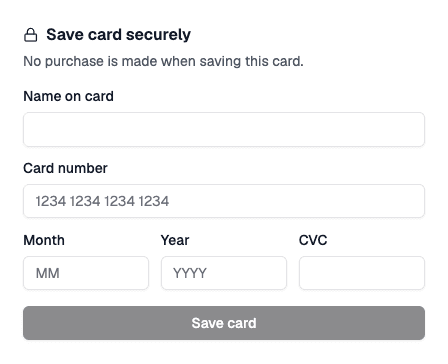
Confirm from your server
postMessage or redirect callback. Poll the partner setup-status endpoint on your server and expose only the necessary status to your website. Do not trust iframe load events as evidence a card was saved.EMRG checks the connection's framing policy before rendering and fails closed if it cannot validate the link. The form keeps its capabilities in memory and removes them from the address bar; after a reload, reopen the original full link if it is still valid. Origin changes apply on subsequent page loads.
Card entry goes directly from the EMRG-origin form to EMRG. Do not proxy it through your server, reproduce the fields on your site, or call /hosted-card-setup yourself. Those endpoints are reserved for the EMRG page and do not accept partner API keys as card-entry authority.
Book an appointment
/partner/appointmentsRequires booking:write.
Books using the current availability and a verified saved card. Maximum JSON body: 16 KiB. No purchase is made. Capacity is checked and the appointment committed atomically.
| Field | Type / required | Meaning |
|---|---|---|
externalBookingId | string · required | Your stable booking ID; 1–128 letters, digits, dots, underscores, colons or hyphens. Scoped to connection/environment. |
patientId | UUID · required | Patient owned by this connection. |
paymentMethodId | UUID · required | Returned by a succeeded setup for this patient and connection. Must be active, unexpired and associated with the current payment credentials. |
appointmentTypeId | integer · required | Published service from this connection's catalog. |
providerId | UUID · required | Choose one provider from the selected slot's providerIds. |
startTime | UTC timestamp · required | Use availability's exact value with explicit Z or +00:00. End time and duration are computed by EMRG. |
notes | string | null · optional | Up to 8,000 characters of plain text. Newlines, carriage returns and tabs are allowed. Store questionnaire answers here; no custom answer object is accepted. |
analyticsSessionId / bookingFlowId | UUIDs · optional | Supply both non-empty anonymous IDs to correlate the booking with website events. Missing/invalid telemetry IDs do not block booking; correlation is ignored instead. |
curl --request POST 'https://api.joinemrg.com/api/v1/partner/appointments' \
  --header "Authorization: Bearer $EMRG_API_KEY" \
  --header "Content-Type: application/json" \
  --header 'Idempotency-Key: booking-2048-attempt-1' \
  --data '{
  "externalBookingId": "booking-2048",
  "patientId": "10000000-0000-4000-8000-000000000003",
  "paymentMethodId": "10000000-0000-4000-8000-000000000006",
  "appointmentTypeId": 12,
  "providerId": "10000000-0000-4000-8000-000000000004",
  "startTime": "2026-11-03T15:00:00Z",
  "notes": "Question: What would you like to discuss?\nAnswer: Follow-up consultation.",
  "analyticsSessionId": "10000000-0000-4000-8000-000000000008",
  "bookingFlowId": "10000000-0000-4000-8000-000000000009"
}'{
"requestId": "10000000-0000-4000-8000-000000000001",
"appointmentId": "10000000-0000-4000-8000-000000000007",
"patientId": "10000000-0000-4000-8000-000000000003",
"providerId": "10000000-0000-4000-8000-000000000004",
"startTime": "2026-11-03T15:00:00Z",
"endTime": "2026-11-03T15:30:00Z",
"status": "SCHEDULED"
}Retain appointmentId. The same external booking ID and identical body returns the original booking even with a different retry key. Changing any booking details after successful creation returns EXTERNAL_BOOKING_ID_CONFLICT; this endpoint cannot edit or reschedule an appointment.
Use Get an appointment with the returned ID to verify saved notes and retrieve the current status or schedule after staff changes. A replay still returns the original creation response.
On SLOT_UNAVAILABLE, retain the patient and saved card, refresh availability and ask for another slot. After confirming the prior attempt failed, submit the changed slot with a new idempotency key. The external booking ID can stay the same when no booking was created for it.
Appointment, required per-visit forms, referral records and the live booking-completion event are committed together. Reporting, webhooks, confirmations and reminder scheduling run asynchronously; a 201 confirms the booking, not that every notification has already been delivered. Do not send a client-side booking_completed event.
Endpoint errors: INVALID_REQUEST, INVALID_BOOKING, SLOT_UNAVAILABLE, EXTERNAL_BOOKING_ID_CONFLICT, PAYMENT_METHOD_UNAVAILABLE, PATIENT_NOT_FOUND, PATIENT_UNAVAILABLE, APPOINTMENT_TYPE_NOT_FOUND, PROVIDER_NOT_FOUND. See error handling for these and shared authentication, retry, and configuration errors.
Get an appointment
/partner/appointments/{id}Requires booking:read.
Read the current details of an appointment created by this connection in this environment. Pass the UUID returned as appointmentId by booking creation, or as resourceId on its successful request receipt. No request body or idempotency key is required.
curl --request GET 'https://api.joinemrg.com/api/v1/partner/appointments/10000000-0000-4000-8000-000000000007' \
--header "Authorization: Bearer $EMRG_API_KEY"{
"appointmentId": "10000000-0000-4000-8000-000000000007",
"externalBookingId": "booking-2048",
"patientId": "10000000-0000-4000-8000-000000000003",
"appointmentTypeId": 12,
"providerId": "10000000-0000-4000-8000-000000000004",
"bookingClinicId": 28,
"serviceProviderClinicId": 29,
"environment": "sandbox",
"startTime": "2026-11-03T15:00:00Z",
"endTime": "2026-11-03T15:30:00Z",
"status": "SCHEDULED",
"notes": "Reason for visit: Initial consultation"
}| Field | Type / required | Meaning |
|---|---|---|
appointmentId | UUID | The appointment's EMRG ID. |
externalBookingId | string | Your external ID supplied on the original booking request. |
patientId | UUID | The appointment's patient, still associated with this connection. |
appointmentTypeId | integer | Current appointment type ID. |
providerId | UUID | Current assigned provider ID. |
bookingClinicId / serviceProviderClinicId | integer | Connection's booking and service-provider clinics; equal for a direct clinic. |
environment | sandbox | live | Environment selected by the API key. |
startTime / endTime | UTC timestamp | Current scheduled start and end, including staff rescheduling. |
status | string | Current appointment status, such as SCHEDULED or CANCELLED. Treat as an extensible string, not a closed enum. |
notes | string | null | Current saved appointment booking notes, including later staff edits. No patient chart notes or card details. |
Current state versus original receipt
Keys rotated within the same connection retain access. Another connection, even at the same clinic, cannot retrieve the appointment. Widget/staff-created appointments are not exposed by this endpoint. An unknown ID or a record outside the connection's current clinic/patient scope returns 404 APPOINTMENT_NOT_FOUND. A removed patient association, deleted patient or ended consumer referral also makes the record unavailable. An inactive booking relationship can return BOOKING_RELATIONSHIP_UNAVAILABLE.
Responses use Cache-Control: no-store. Keep these details on your server and protect notes as patient data. Normal read rate limits apply; respect Retry-After on 429. A failed read must never trigger a replacement booking. This endpoint does not cancel, reschedule or update appointments.
Endpoint errors: APPOINTMENT_NOT_FOUND, BOOKING_RELATIONSHIP_UNAVAILABLE. See error handling for these and shared authentication, retry, and configuration errors.
Send events
/partner/analytics/eventsRequires analytics:write.
Send a JSON object containing events, an array of 1–20 events. Maximum body: 32 KiB. Send through your server with its own idempotency key; never expose the partner key to a browser analytics collector.
curl --request POST 'https://api.joinemrg.com/api/v1/partner/analytics/events' \
  --header "Authorization: Bearer $EMRG_API_KEY" \
  --header "Content-Type: application/json" \
  --header 'Idempotency-Key: analytics-batch-3001' \
  --data '{
  "events": [
    {
      "eventId": "10000000-0000-4000-8000-000000000010",
      "sessionId": "10000000-0000-4000-8000-000000000008",
      "bookingFlowId": "10000000-0000-4000-8000-000000000009",
      "eventName": "booking_started",
      "occurredAt": "2026-11-01T14:00:00Z",
      "pageHost": "www.clinic.example",
      "pagePath": "/book",
      "referrerHost": "www.example.com",
      "utmSource": "newsletter",
      "utmMedium": "email",
      "utmCampaign": "fall_booking",
      "deviceCategory": "desktop"
    }
  ]
}'{
"requestId": "10000000-0000-4000-8000-000000000001",
"accepted": 1,
"duplicates": 0,
"excludedFromReporting": false
}The example timestamp is illustrative; use the actual event occurrence time. 202 means durably accepted, not already visible in a report. accepted counts newly stored events; duplicates counts identical event IDs already accepted. Sandbox returns excludedFromReporting: true.
Keep each event's ID, timestamp and payload immutable when retrying. The same event can be resent in another batch: identical content is deduplicated within the connection/environment. A changed event with the same ID yields ANALYTICS_EVENT_CONFLICT and rejects the batch. Duplicate event IDs within a single batch are invalid.
New events must be no more than seven days old or five minutes ahead. Previously accepted identical events can still deduplicate after that window. A batch is atomic: a failure must not be interpreted as partial acceptance. Use a new request key if you intentionally change the batch.
Keep booking independent
Endpoint errors: INVALID_REQUEST, INVALID_ANALYTICS_EVENT, INVALID_EVENT_TIME, ANALYTICS_EVENT_CONFLICT. See error handling for these and shared authentication, retry, and configuration errors.
Event reference
| Event | Send when |
|---|---|
| brand_page_view | A public clinic/brand landing page is viewed; bookingFlowId may be omitted. |
| widget_opened | The booking experience is opened, including your custom API-powered booking UI. |
| booking_started | The visitor begins the booking flow. |
| booking_service_selected | The visitor selects an appointment type. |
| booking_provider_selected | The visitor explicitly selects a provider; do not fabricate this stage if your flow skips it. |
| booking_time_selected | The visitor chooses a slot. |
| booking_form_submitted | The visitor submits your booking-details/questionnaire step. No answers or patient details belong in the event. |
| booking_completed | Reserved: EMRG records this after a live booking commits. Never send it in an events batch. |
| Field | Type / required | Meaning |
|---|---|---|
eventId | UUID · required | Random, non-empty ID for one event occurrence. Reuse only when retrying the same event. |
sessionId | UUID · required | Anonymous website session ID shared by related events. Not a patient ID or API credential. |
bookingFlowId | UUID · required except brand_page_view | Anonymous ID for one booking journey; retain across stages and retries. Pass it with sessionId as analyticsSessionId when booking. |
eventName | string · required | One of the seven client event names above; case-sensitive. |
occurredAt | timestamp · required | Actual occurrence time with explicit Z or timezone offset. New events: within seven days past / five minutes future. |
pageHost | string · required | DNS hostname only, at most 255 characters. No scheme, port, path or trailing dot. Stored lowercase. |
pagePath | string · required | Static public route, at most 512 characters. Starts with /; then only letters, digits, slash, underscore and hyphen. No query or fragment. |
referrerHost | string | null · optional | Hostname only, same rules as pageHost. Do not send the full referrer URL. |
utmSource / utmMedium | string | null · optional | Non-empty campaign codes up to 100 characters each; letters, digits, dot, underscore and hyphen only. |
utmCampaign | string | null · optional | Same campaign-code rules, up to 150 characters. |
deviceCategory | string | null · optional | desktop, tablet or mobile. |
Generate sessionId and bookingFlowId independently of patient records. Keep one flow ID for one booking attempt journey, including choosing another slot. Start a new flow for a separate booking. Only send stages that actually occurred.
Using both the widget and a custom API booking form?
sessionStorage["emrg_widget_analytics_session_id"] for custom API events and the appointment's analyticsSessionId. Initialize one shared UUID before either tracker sends events if the storage entry does not yet exist. Keep separate flow IDs for separate booking journeys. Different tabs, origins or unavailable browser storage can prevent sharing; different session IDs remain separate visits.Combined reports count a shared session once per funnel stage. Widget and Custom API summaries can each include that session, so their counts must not be added together. Page views count accepted events, not unique sessions; avoid sending the same page view through both trackers. API-only sites do not need to install the widget for analytics.
Strict privacy boundary
EMRG uses the anonymous session/flow IDs to correlate funnel events and booking completion. Events can arrive after the appointment; accepted late events are processed asynchronously to update attribution. Do not infer immediate reporting completion from the acceptance response.
Look up a request
/partner/requests/by-idempotency-key/{key}Requires booking:read.
Supply the original Idempotency-Key as a URL-encoded path segment, with the same connection and environment. Key rotation within that connection is supported. No request body.
curl --request GET 'https://api.joinemrg.com/api/v1/partner/requests/by-idempotency-key/booking-2048-attempt-1' \
--header "Authorization: Bearer $EMRG_API_KEY"{
"requestId": "10000000-0000-4000-8000-000000000001",
"state": "succeeded",
"operation": "appointment.create",
"originalStatus": 201,
"resourceType": "appointment",
"resourceId": "10000000-0000-4000-8000-000000000007",
"createdAt": "2026-11-01T14:05:00Z"
}| Field | Type / required | Meaning |
|---|---|---|
requestId | UUID | Durable write receipt ID, not necessarily this lookup's X-Request-Id. |
state | succeeded | failed | Whether the committed write response was successful; not the state of downstream card processing or delivery. |
operation | string | patient.create, card_setup.create, appointment.create or analytics.events. |
originalStatus | integer | HTTP status of the committed write, including stored definitive rejections. |
resourceType / resourceId | string | null | patient, card_setup_session or appointment and its ID when applicable. Analytics acceptance and failed writes may have no resource. |
createdAt | UTC timestamp | When the receipt was stored. |
- After a timeout or unknown outcome, look up the original key.
- If a receipt exists, use its status/resource. To recover the original response, replay the identical POST with the same key. For an appointment's current details, use its resource ID with Get an appointment.
- If lookup returns 404, wait briefly and resend the identical POST with that same key. It may still be processing.
- On
REQUEST_PROCESSINGor 429, back off. Do not switch keys to force another execution.
A successful card_setup.create receipt means a session was created, not that a card was saved. Read that session's status. Receipt responses do not include full response bodies or hosted capabilities; replaying session creation can return its URL, with the original expiry.
Endpoint errors: INVALID_IDEMPOTENCY_KEY, REQUEST_NOT_FOUND. See error handling for these and shared authentication, retry, and configuration errors.
Request history
Clinic administrators open API & Webhooks → Requests to inspect live request metadata. Match an attempt using its X-Request-Id response header; record that header on your server when troubleshooting.
| Recorded | Excluded |
|---|---|
| Live patient, card-session, appointment and analytics writes, including replays | All sandbox requests |
| Failures for catalog, providers, availability and setup-status reads, including 429s | Successful 2xx reads for those four high-volume operations |
| Context, appointment and receipt lookups | Raw request/response bodies, API secrets, raw idempotency keys, setup capabilities and card-entry requests |
Entries contain timestamp, operation, HTTP method/route template, status/error code, duration, replay flag and associated connection/key. Detail views show metadata summaries and recovery guidance, plus a linked receipt/resource when available. They are not captured HTTP payloads.
Logs are retained for 90 days with hourly cleanup. Logging is best-effort and never rolls back a booking; rejected credentials that cannot be attributed to a live connection are not recorded. An absent log entry is not evidence that a write failed. Use durable receipt reconciliation for that decision.
A 5xx, disconnect or processing conflict can have an unknown outcome. Share the request ID, time, environment, operation and safe error code with support; do not share secrets, complete setup links or card details. The 90-day request-log policy is distinct from write receipts.
Partner webhooks
Configure webhooks separately in API & Webhooks to receive signed patient, appointment and payment events. The webhook signing secret is separate from your Booking API key.
Live partner creation queues patient.created and appointment.created events as part of the committed operation, for configured destinations. For provider-group appointments, the service provider and referring clinic can each receive their own delivery. Sandbox booking operations do not send live webhooks.
Delivery is asynchronous and at-least-once. Verify signatures against the raw body, validate timestamp freshness, deduplicate by event_id and acknowledge promptly with 2xx. Do not depend on arrival order or use a missing webhook as proof a booking failed.
Full webhook reference