
Partner Webhooks for Clinic Brands
Send EMRG patient, appointment, and payment events to your CRM, marketing automation platform, or data warehouse using signed Partner Webhooks.
Partner Webhooks for Clinic Brands
Partner Webhooks let your Clinic Brand send EMRG patient, appointment, and payment events to an external system as they happen. Common destinations include your CRM, marketing automation platform, analytics warehouse, attribution tooling, or a custom integration built by your developer team.
Each webhook is configured per clinic. Your clinic has its own destination URL and signing secret, and it only receives events for patients connected to your clinic: the patients you treat, plus patients you referred to another clinic (see Referred patients).
Every delivery is signed with HMAC-SHA256 so your developer or integration partner can confirm the event really came from EMRG before processing it. The signing secret itself is never transmitted in the webhook request.
Who should use this guide
Use this guide if you are a Clinic Brand setting up an integration with a partner system. You can configure the webhook destination yourself in EMRG, but your developer, CRM administrator, or integration partner will usually need to build or configure the receiving endpoint.
Before you start, ask your developer team or partner for:
- A publicly reachable HTTPS endpoint URL where EMRG should send events.
- Confirmation that their endpoint can verify HMAC-SHA256 signatures.
- The internal owner who should receive the signing secret after you create the destination.
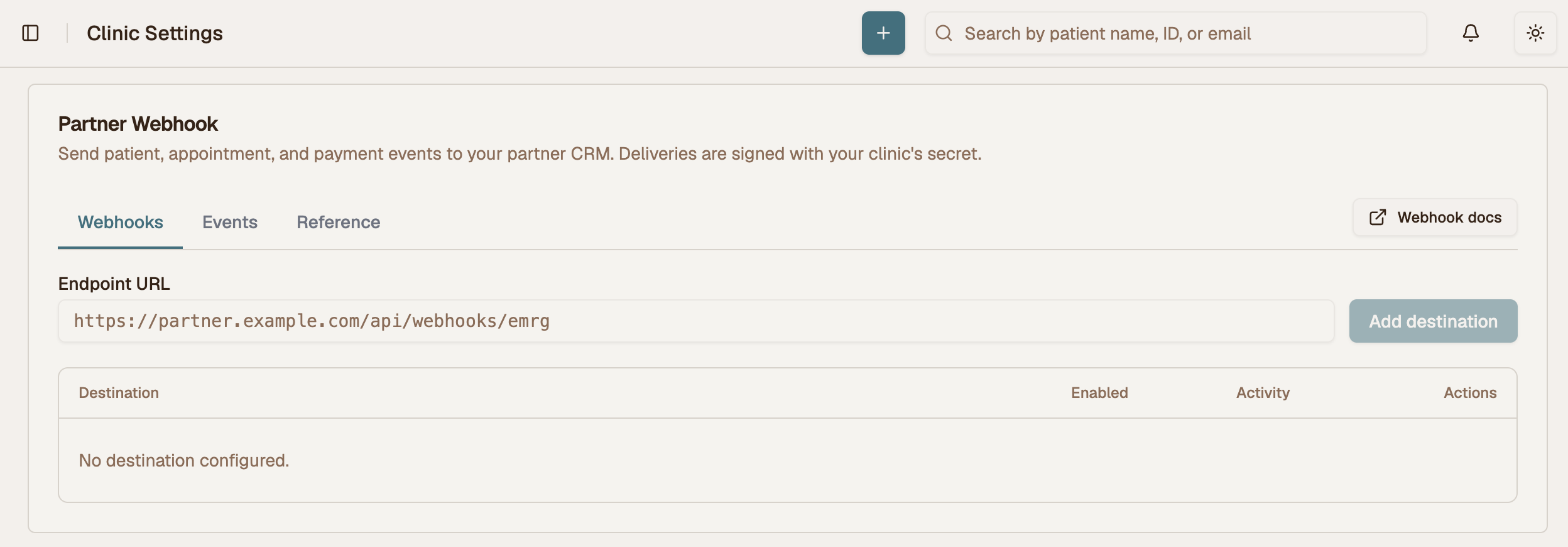 Partner Webhook settings screen
Set up your webhook
Configuration lives in Clinic Management → Settings → Partner Webhook, and always applies to your
currently active clinic. Requires clinic_admin, bme_admin, or platform_admin. If you manage
multiple clinics, switch to the correct clinic first with the clinic switcher.
-
Get the endpoint URL from your developer or partner. This is the URL that will receive EMRG webhook events. It must be an absolute
https://URL because payloads can contain patient data and are never sent over plainhttp. In a local development environment only,http://localhost:…is accepted so your developer can test without TLS. -
Enter the endpoint URL and click Add destination. EMRG creates the destination, generates a strong signing secret, shows the secret in a dialog with a Copy secret button, and turns the webhook on.
-
Copy the signing secret and send it securely to your developer team or partner. They need this secret to configure the receiving endpoint and verify that webhook events came from EMRG. Treat it like a password: do not paste it into source code, support tickets, or public channels.
-
Ask your developer to configure signature verification. They should verify the
X-EMRG-Signatureheader against the raw request body before trusting or storing the event. The examples below show how to do this in Node.js and Python. -
Send a test event from the destination's
⋯menu. This POSTs a syntheticwebhook.testevent to the endpoint right away and reports the partner's HTTP response. Use this to confirm the endpoint is reachable and signature verification works before real patient, appointment, or payment events flow through the integration.
Events begin flowing as soon as the destination is added. Historical data is never replayed — the clinic starts receiving events from that moment on.
Use the Enabled toggle to pause and resume delivery at any time. If you save a changed URL for an existing destination, EMRG only updates the URL; it will not re-enable a webhook you deliberately switched off.
After a destination is configured, use the destination's ⋯ menu to edit the URL, send a test
event, or reveal the signing secret if your developer needs it again.
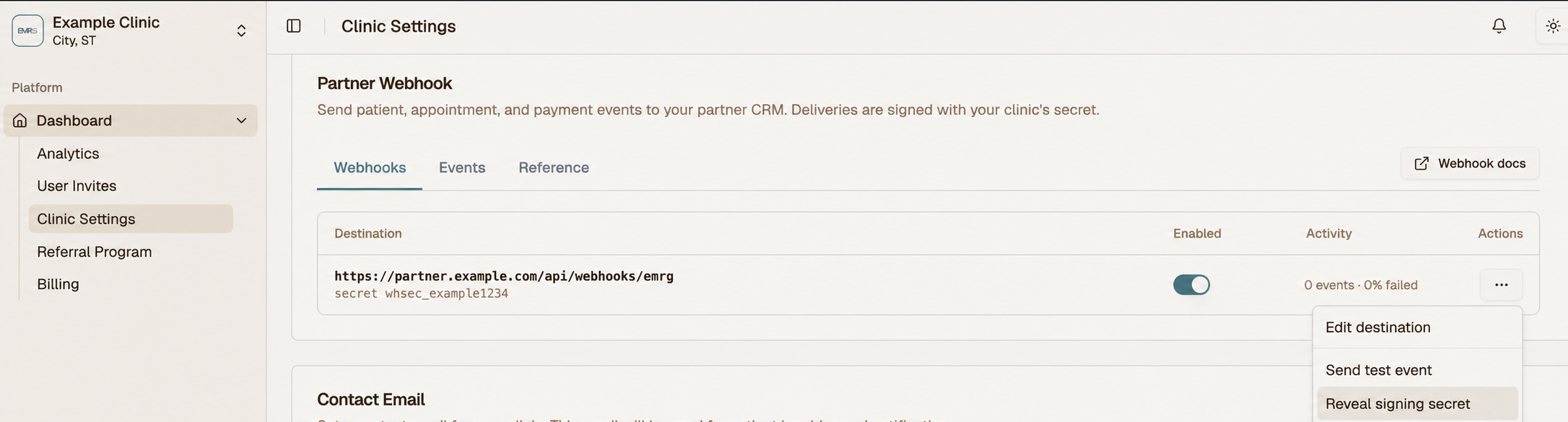 Partner Webhook destination actions menu
What to give your developer
Send your developer or partner this page, plus:
- The endpoint URL they gave you, so they can confirm it was entered correctly.
- The signing secret you copied when creating the destination.
- The event types they should expect to process.
- A reminder to deduplicate events on
event_idand respond quickly with a2xxstatus.
Removing a webhook
Remove destination in the ⋯ menu clears the endpoint and secret and disables the webhook. Any
deliveries already queued stop retrying.
Technical reference for developers
The rest of this guide is intended for your developer or integration partner. Clinic Brand admins can share this section with the team responsible for receiving and processing webhook events.
Delivery behavior
- Asynchronous. Webhooks are queued and delivered by a background worker (roughly every 10 seconds). A slow or failing partner endpoint never slows down or fails anything inside EMRG.
- At-least-once. Retries mean the same event can arrive more than once.
Deduplicate on
event_id— it is stable across every retry attempt of the same event. - Acknowledgement. Return any
2xxstatus to acknowledge. Anything else (or a timeout) is treated as a failure and retried. - Timeout. 30 seconds per attempt. Acknowledge fast and process asynchronously on your side.
- Retries. Up to 4 attempts total, with backoff at roughly +30s, +60s, +120s after the
initial try. After the 4th failure the delivery is marked
Failedand is not retried. - Ordering is not guaranteed. Because every event carries the full
patientblock, you can upsert the patient on any event without needingpatient.createdto arrive first. payment.receivedderivation. Payment events are derived from settled transactions by the same periodic sweep, so they arrive on the same cadence as everything else. The sweep is deliberately conservative about how far it advances its own bookmark, which means a payment may be re-examined internally — but it is only ever delivered once, and never skipped.
Delivery log
The Events tab shows each event's status, attempt count, and the partner's HTTP response or error, plus running pending/failed counts.
It records real events only. Test sends are delivered synchronously and their result is reported at send time, so they never appear here — if you send a test and then look for it in the log, that is expected.
The list is paginated 10 at a time, newest first.
Each row's ⋯ menu has two actions:
View details opens the exact JSON body that was POSTed — the same bytes the signature was computed over — along with the event ID, dedup key, and last error, with a Copy button on the payload. This is the fastest way to settle a "we never got it" / "you sent us the wrong thing" question.
Replay delivery requeues a delivery for a fresh set of attempts. Available on anything in a
terminal state (Sent or Failed), so you can recover a delivery the partner dropped as well as one
that never got through. The stored payload is re-sent unchanged, including its original
event_id — a partner that deduplicates correctly will recognise a replay of something they
already processed.
Reference tab
The Reference tab in the app is a condensed version of this page — the envelope, the delivery
rules, and a sample data block for every event. Useful for answering a partner's question without
leaving the settings screen.
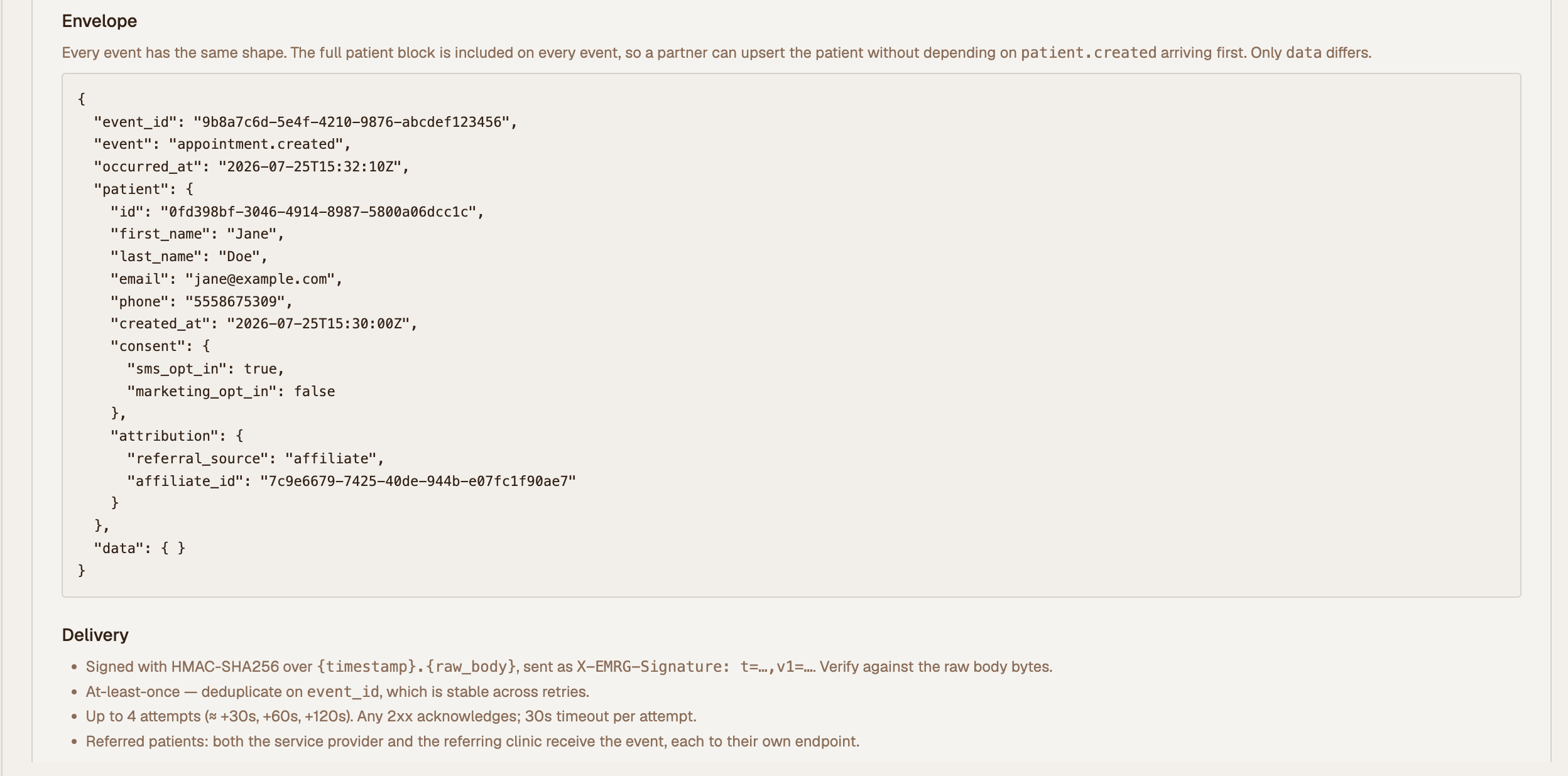 Partner Webhook Reference tab with envelope and delivery rules
Request headers
POST /your/webhook/path HTTP/1.1
Content-Type: application/json
X-EMRG-Event-Id: 9b8a7c6d-5e4f-4210-9876-abcdef123456
X-EMRG-Delivery-Id: 9b8a7c6d-5e4f-4210-9876-abcdef123456
X-EMRG-Timestamp: 1784041800
X-EMRG-Signature: t=1784041800,v1=3f9a1c...e07b
| Header | Meaning |
|---|---|
X-EMRG-Event-Id | Stable identifier for the logical event. Unchanged across retries — dedupe on this. Also present in the body as event_id. |
X-EMRG-Delivery-Id | Identifier of the delivery record in EMRG. Useful when reporting a problem to support. |
X-EMRG-Timestamp | Unix seconds at send time. Part of the signed payload. |
X-EMRG-Signature | t=<timestamp>,v1=<hmac_sha256_hex> |
Verify the webhook signature
Your developer or integration partner should complete this step before processing webhook data. Clinic Brand admins do not need to write this code, but they should make sure their partner confirms signature verification is enabled.
Verify before trusting a webhook. Compute HMAC-SHA256 over {timestamp}.{raw_request_body}
using the clinic's signing secret, then compare it to the v1 value.
Use the raw request body bytes exactly as received — do not re-serialize the parsed JSON, since key order and whitespace changes will break the signature.
Node.js / Express
const crypto = require("crypto");

// Give express the raw body so the signature can be checked against the exact bytes.
app.post(
  "/webhooks/emrg",
  express.raw({ type: "application/json" }),
  (req, res) => {
    const header = req.get("X-EMRG-Signature") ?? "";
    const parts = Object.fromEntries(
      header.split(",").map((kv) => kv.split("=")),
    );
    const { t: timestamp, v1: signature } = parts;

    const expected = crypto
      .createHmac("sha256", process.env.EMRG_WEBHOOK_SECRET)
      .update(`${timestamp}.${req.body.toString("utf8")}`)
      .digest("hex");

    // Constant-time comparison avoids leaking the signature via timing.
    const ok =
      signature &&
      crypto.timingSafeEqual(Buffer.from(expected), Buffer.from(signature));
    if (!ok) return res.sendStatus(401);

    // Reject anything older than 5 minutes to limit replay of a captured request.
    if (Math.abs(Date.now() / 1000 - Number(timestamp)) > 300) {
      return res.sendStatus(401);
    }

    const event = JSON.parse(req.body.toString("utf8"));
    // ... enqueue for processing, then acknowledge
    res.sendStatus(200);
  },
);
Python / Flask
import hashlib, hmac, os, time

@app.route("/webhooks/emrg", methods=["POST"])
def emrg_webhook():
    raw = request.get_data()  # raw bytes, not request.json
    header = request.headers.get("X-EMRG-Signature", "")
    parts = dict(kv.split("=", 1) for kv in header.split(","))
    timestamp, signature = parts.get("t", ""), parts.get("v1", "")

    expected = hmac.new(
        os.environ["EMRG_WEBHOOK_SECRET"].encode(),
        f"{timestamp}.{raw.decode()}".encode(),
        hashlib.sha256,
    ).hexdigest()

    if not hmac.compare_digest(expected, signature):
        return "", 401
    if abs(time.time() - int(timestamp)) > 300:
        return "", 401

    event = request.get_json()
    # ... enqueue for processing, then acknowledge
    return "", 200
Retrieving or rotating a secret
Reveal secret shows the current secret again without changing it — use this when the partner has misplaced it. Reveals are audit-logged and rate-limited.
Rotate generates a replacement and discards the old one immediately. Deliveries signed with the new secret will fail verification on the partner side until the partner is updated, so coordinate the swap. Deliveries that fail during the gap retry on the normal schedule (about 3.5 minutes of coverage) and can be replayed from the delivery log afterwards.
Event envelope
Every event has the same top-level shape: the event name, when it happened, the full patient
block, and an event-specific data object.
{
  "event_id": "9b8a7c6d-5e4f-4210-9876-abcdef123456",
  "event": "appointment.created",
  "occurred_at": "2026-07-22T18:32:10Z",
  "patient": {
    "id": "0fd398bf-3046-4914-8987-5800a06dcc1c",
    "first_name": "Jane",
    "last_name": "Doe",
    "email": "jane@example.com",
    "phone": "5558675309",
    "created_at": "2026-07-22T18:30:00Z",
    "consent": {
      "sms_opt_in": true,
      "marketing_opt_in": false
    },
    "attribution": {
      "referral_source": "affiliate",
      "affiliate_id": "7c9e6679-7425-40de-944b-e07fc1f90ae7"
    }
  },
  "data": {
    "appointment_id": "b7f1c2a9-4e5d-4a6b-8c1d-2f3e4a5b6c7d",
    "appointment_date": "2026-07-28T15:00:00Z",
    "service_name": "Initial Consultation"
  }
}
Patient block
| Field | Type | Notes |
|---|---|---|
id | uuid | Stable EMRG patient identifier — use as your upsert key. |
first_name / last_name | string | |
email | string | null | |
phone | string | null | 10 digits, unformatted. |
created_at | timestamp | When the patient record was created, not when this event fired. |
consent.sms_opt_in | bool | Transactional SMS — appointment reminders and similar. |
consent.marketing_opt_in | bool | Marketing email consent. |
attribution.referral_source | enum | not_specified, affiliate, other_patient, social_media, google, youtube. |
attribution.affiliate_id | uuid | null | Set only when referral_source is affiliate. |
All timestamps are UTC, ISO 8601.
Events
| Event | Fires when |
|---|---|
patient.created | A new patient record is created (patient portal signup or staff entry). |
appointment.created | An appointment is booked. |
appointment.completed | An appointment is marked completed. |
appointment.cancelled | An appointment is cancelled, by staff or by the patient. |
appointment.no_show | An appointment is marked as a no-show. |
payment.received | A payment settles successfully — checkout, staff-recorded payment, or recurring membership billing. |
webhook.test | A manual test send from the Partner Webhook settings screen. Carries an obviously-synthetic patient block. |
Referred patients
When a consumer clinic refers a patient to a service provider, the provider treats and bills the patient — so appointments and payments belong to the provider. But the referring clinic owns the patient relationship and needs the same visibility.
Both clinics receive the event, each to their own endpoint, signed with their own secret, provided each has a webhook configured. Neither has to be aware of the other, and a clinic only ever receives events for its own patients — its own, plus the ones it referred out.
Each copy is a separate delivery with its own event_id, so the two clinics' logs are independent:
one partner failing does not affect the other, and either copy can be replayed on its own.
patient.created
data is empty; everything is in the patient block.
{
  "event_id": "1a2b3c4d-0000-4000-8000-000000000001",
  "event": "patient.created",
  "occurred_at": "2026-07-22T18:30:00Z",
  "patient": { "…": "see Patient block above" },
  "data": {}
}
appointment.created · appointment.completed · appointment.cancelled · appointment.no_show
All four share one shape; only event differs.
{
  "event_id": "1a2b3c4d-0000-4000-8000-000000000002",
  "event": "appointment.completed",
  "occurred_at": "2026-07-28T15:45:00Z",
  "patient": { "…": "see Patient block above" },
  "data": {
    "appointment_id": "b7f1c2a9-4e5d-4a6b-8c1d-2f3e4a5b6c7d",
    "appointment_date": "2026-07-28T15:00:00Z",
    "service_name": "Initial Consultation"
  }
}
| Field | Type | Notes |
|---|---|---|
appointment_id | uuid | Stable across the appointment's lifecycle — the same id appears on created and later completed/cancelled/no_show. |
appointment_date | timestamp | Scheduled start time. |
service_name | string | null | Appointment type name. |
payment.received
{
  "event_id": "1a2b3c4d-0000-4000-8000-000000000003",
  "event": "payment.received",
  "occurred_at": "2026-07-22T18:45:00Z",
  "patient": { "…": "see Patient block above" },
  "data": {
    "order_id": "c3d4e5f6-a7b8-4c9d-8e0f-1a2b3c4d5e6f",
    "amount_usd": 299.00,
    "products": [{ "name": "Semaglutide 1mg", "quantity": 1 }]
  }
}
| Field | Type | Notes |
|---|---|---|
order_id | uuid | Order the payment settled against. |
amount_usd | decimal | Amount in dollars, e.g. 299.00. |
products | array | Line items on the order. Empty for orders with no itemized products. |
Refunds do not emit an event. Only successful payments are sent.
Implementation checklist
- Endpoint is publicly reachable over HTTPS and accepts
POSTwith a JSON body. - Signature verified against the raw body before any processing.
- Timestamp freshness checked (5-minute tolerance recommended).
- Events deduplicated on
event_id. - Responds
2xxquickly; heavy work happens asynchronously. - Signing secret stored as a secret, not in source control.
- Test event received and verified end-to-end before enabling.
Troubleshooting
| Symptom | Likely cause |
|---|---|
| Signature never matches | Re-serialized JSON instead of using raw bytes; or the secret was rotated and not updated. |
Delivery log shows Failed with a timeout | Endpoint took longer than 30 seconds. Acknowledge first, process after. |
| Delivery log shows HTTP 401/403 | Partner-side auth is rejecting EMRG. Note that EMRG sends no bearer token or API key — authentication is the signature. |
| Events stopped arriving | Check the webhook is still enabled and the endpoint/secret are still set for that clinic. |
| Duplicate records on the partner side | Not deduplicating on event_id. Delivery is at-least-once by design. |
| No events at all after enabling | Enabling never replays history — only events occurring after that moment are sent. |